JavaScript in iOS
swift JavaScript iOS Estimated reading time: 11 minutesRecently I was faced with a task that required to somehow communicate with the web and get some data from it, later, after processing and using this data, some information must be returned back to the web. This is not a unique task, and developers are often faced with this kind of behaviour. On iOS, this can be done using JavaScript integration.
Adding handling and processing of JavaScript into an iOS native app can unlock powerful capabilities such as dynamic content rendering, enhanced interactivity, and code reuse across platforms.
This article provides a concise overview of how JavaScript can be embedded in an iOS app using Swift, including a simple implementation example.
Why?
- Dynamic Functionality: JavaScript enables you to execute scripts dynamically without requiring app updates.
- Cross-Platform Code Reuse: Leverage existing JavaScript libraries and logic for consistent behavior across web and mobile platforms.
- Flexible Content Rendering: JavaScript can be used to render HTML/CSS content within a WebView.
- Message intercepting: As a developer you may require to react on some events in displayed webView or to send information to webView from native app. This also includes:
- Inject
JavaScriptcode into webpages running in your web view. - Install custom
JavaScriptfunctions that call through to your app’s native code. - Specify custom filters to prevent the webpage from loading restricted content.
- Inject
Setting Up
In iOS, you can execute JavaScript within a native app using two primary tools:
WKWebView: AWebKit-powered view that enables interaction with web content andJavaScriptexecution. The most interesting for us isWKUserContentControllerJavaScriptCore: A framework for runningJavaScriptdirectly in your app without a WebView.
The best way to understand something is to try it. Let’s dive into a basic implementation example of using WKWebView.
WKWebView
Step 1: Create a New Project
- Open Xcode and create a new project.
- Choose “App” under the iOS platform and name your project.
Step 2: Add WKWebView to Your App
To execute JavaScript, add a WKWebView to your app’s view controller.
import UIKit
import WebKit

class ViewController: UIViewController {

    var webView: WKWebView!

    override func viewDidLoad() {
        super.viewDidLoad()

        // Initialize the WebView
        webView = WKWebView(frame: self.view.frame)
        self.view.addSubview(webView)

        // Load local or remote content
        let htmlString = """
        <!DOCTYPE html>
        <html>
        <head><title>JavaScript Test</title></head>
        <body>
        <h1>Hello from JavaScript!</h1>
        <button onclick='sayHello()'>Test</button>
        <script>
            function sayHello() {
                alert('Hello, HK!');
            }
        </script>
        </body>
        </html>
        """

        webView.loadHTMLString(htmlString, baseURL: nil)
    }
}
For SwiftUI the simplest wrapper may be as follow:
struct SwiftUIWebView: UIViewRepresentable {
  let urlRequest: URLRequest
  func makeCoordinator() -> Coordinator {
    Coordinator(self)
  }

  func makeUIView(context: Context) -> WKWebView {
    let webView = WKWebView()
    webView.load(urlRequest)
    return webView
  }

  func updateUIView(_ uiView: WKWebView, context: Context) { }

  final class Coordinator: NSObject {
    var parent: SwiftUIWebView

    init(_ parent: SwiftUIWebView) {
      self.parent = parent

      /// do whatever you needed with WebView
    }
  }
}
Step 3: Interact with JavaScript
You can also execute JavaScript directly from Swift using the evaluateJavaScript method.
webView.evaluateJavaScript("document.body.style.backgroundColor = 'lightblue';") { (result, error) in
    if let error = error {
        print("JavaScript Error: \(error.localizedDescription)")
    } else {
        print("JavaScript executed! Whoohoo!")
    }
}
JavaScriptCore
If you need to execute complex JavaScript logic without rendering HTML, use the JavaScriptCore framework. Here’s a bit more details:
Step 1: Setting Up JavaScriptCore
The JavaScriptCore framework allows you to evaluate scripts, define functions, and interact with JavaScript objects directly in Swift. Begin by importing the framework:
import JavaScriptCore
Step 2: Creating a JavaScript Context
Create a JavaScript context to execute your scripts:
let context = JSContext()
Step 3: Adding and Evaluating Scripts
You can define and evaluate JavaScript directly:
context.evaluateScript("function blackMagic(a, b) { return a * b; }")
Step 4: Calling JavaScript Functions from Swift
Retrieve a JavaScript function and call it with arguments:
if let multiply = context.objectForKeyedSubscript("blackMagic") {
    let result = multiply.call(withArguments: [3, 4])
    print("Result: \(result?.toInt32() ?? 0)") // Output: Result: 12
}
Step 5: Exposing Swift Methods to JavaScript
You can expose Swift functions to the JavaScript context:
context.setObject(unsafeBitCast({ (name: String) in
    print("Hello, \(name)!")
} as @convention(block) (String) -> Void, to: AnyObject.self), forKeyedSubscript: "hello" as NSString)

context.evaluateScript("hello('JavaScriptCore')")
@convention(block)indicate its calling conventions - the block argument indicates an Objective-C compatible block reference. The function value is represented as a reference to the block object, which is an id-compatible Objective-C object that embeds its invocation function within the object. The invocation function uses the C calling convention source
Step 6: Handling Errors
Handle errors gracefully during script evaluation:
context.exceptionHandler = { context, exception in
    if let exception = exception {
        print("JavaScript Exception: \(exception)")
    }
}
There are many more features in this framework, but to cover them all we may need a few more articles.
Components of success
Parts
Now, we know how to start. The most interesting part is coming.
First, let me suggest a way of debugging a WKWebView. Thankfully to WebKit JS or maybe Safari DOM extension, we can inspect WKWebView with Safari. To do so, we must enable this feature:
#if DEBUG
    webView.isInspectable = true
#endif
Than u can inspect your WKWebView in the app using Safari via command Developer->Simulator name->inspectable page name
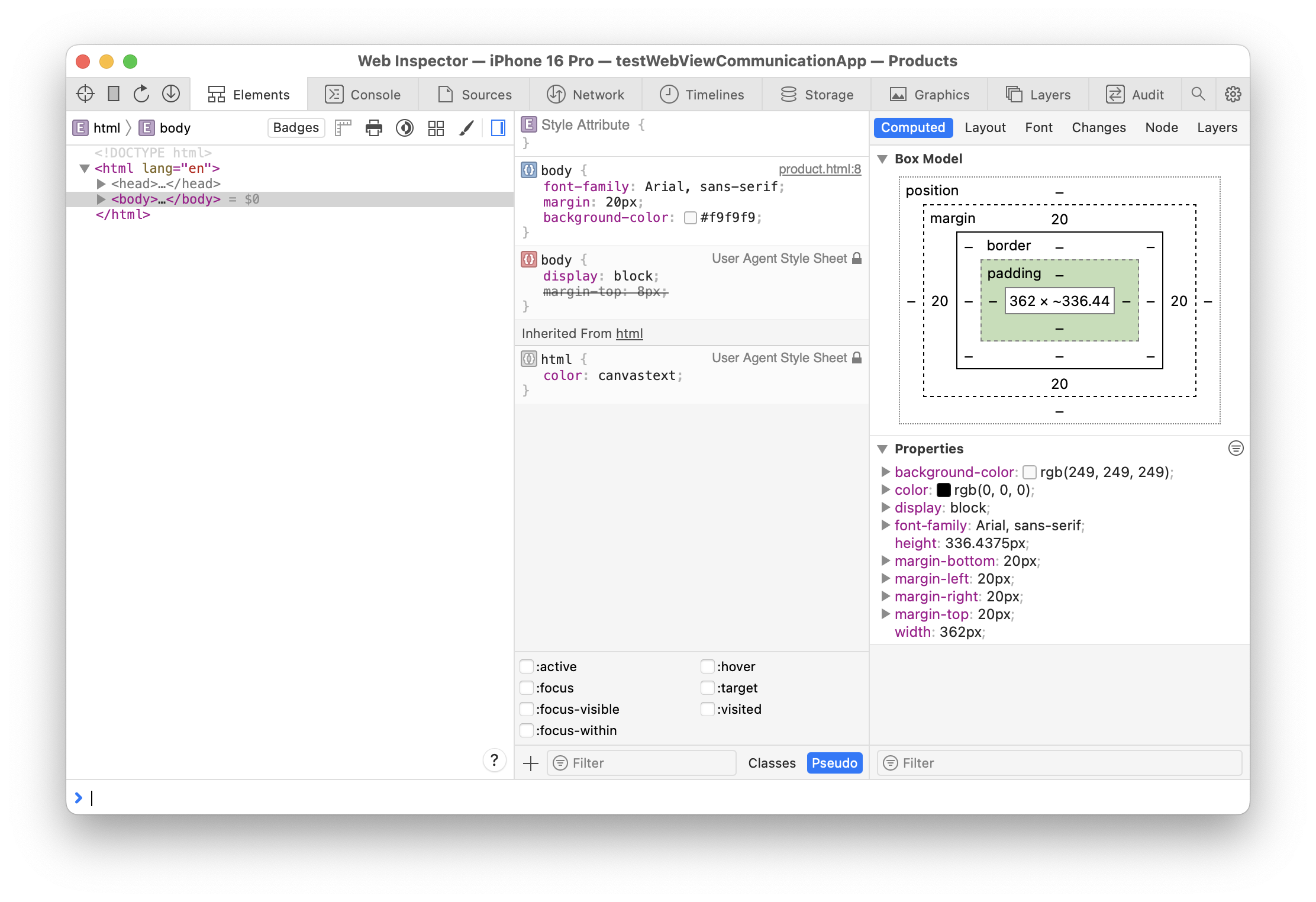
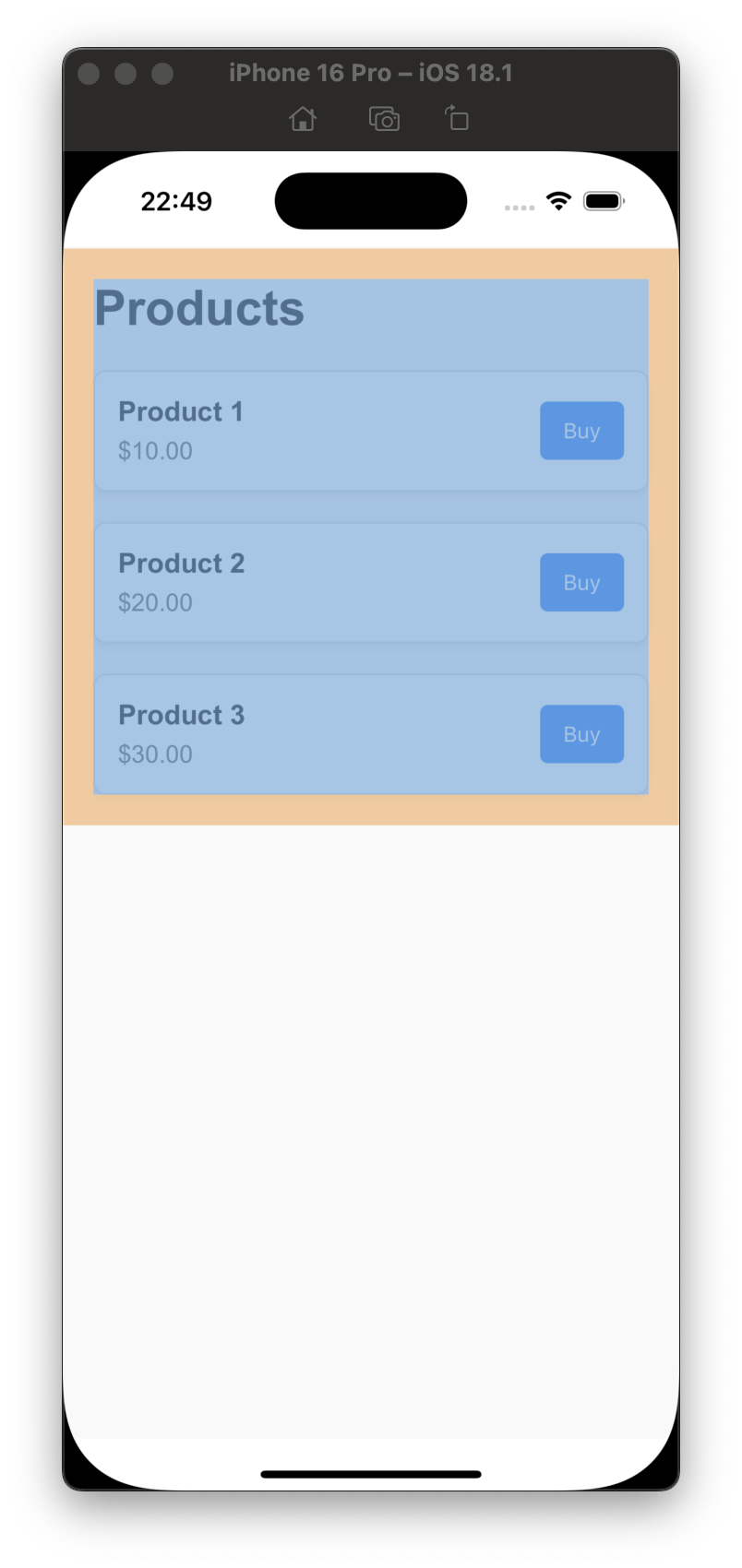
With this inspector, you can easily inspect JavaScript code and execute commands on the fly, dramatically speeding up development.
To receive messages in inspector’s console run
console.log("message")
Second, - is the way we can communicate with the web page.
Apple provides a WKUserContentController that can register a message handler that you can call from your JavaScript code.
window.webkit.messageHandlers.<name>.postMessage(<messageBody>) // where <name> corresponds to the name of message handler
To check if your
messageHandleravailable u can runwindow.webkit.messageHandlers.hasOwnProperty(<name>)orwindow.webkit.messageHandlers.hasOwnProperty.<name>
So, in summary, we need to
- call
add(_:name:)on yourWKUserContentControllerobject - conform to the
WKScriptMessageHandlerprotocol in the object that will handle the communication - implement the required function
userContentController(_ :didReceive:).
Delegate method will return a message as WKScriptMessage, where we need to check name (same name we used in point 1) and a body - value that web will send back to us in response.
+-------------------------+           +------------------+
|     iOS App             |           |   JavaScript     |
|-------------------------|           |------------------|
| evaluateJavaScript  ------------->  |       eval       |
| didReceiveScriptMessage <---------  | window.webkit.   |
|                         |           | messageHandlers. |
|                         |           | name.postMessage |
+-------------------------+           +-----------------+
Pitfall: According to docs: “Allowed types are NSNumber, NSString, NSDate, NSArray, NSDictionary, and NSNull.” This means that a
Booleantype, for example, will be converted to 0 for false and 1 for true.
Third, - injecting JavaScript code can be completed via using WKUserScript:
let scriptSource = "window.webkit.messageHandlers.<name>.postMessage(`Hello, HK!`);"
let script = WKUserScript(source: scriptSource, injectionTime: .atDocumentEnd, forMainFrameOnly: true)
webView.configuration.userContentController.addUserScript(userScript)
Such approach allows you to update style or add additional function to existing webPage.
Ok, that’s enough for start. Let’s wrap everything into some bigger example.
Assembling everything together
The first moment to hightlight, is that combining SwiftUI and WKWebView is combining 2 different approach of programming, so it’s very easy to mix up a logic inside Coordinator for UIViewRepresentable. Heh, it’s a type to coordinate with the view you may sad. Yes, and no.
Using such a way of communication will require a lot of interaction between 2 components, and quickly, your Coordinator and so SwiftUI View that represent WKWebView grows to enormous size, and border of any patterns will be blured, and finally, the result will be a spaghetti code…. Thants not our goal ;]
As result, we can define, that even SwiftUIViewRepresentable must be as thin as possible, to follow blueprint cource from SwiftUI View.
This leads us to idea, to move out all message-processing related code into a separate module. Let’s name it WebViewJSHandler. With this handle, we must be able configure, execute and communicate (something else? - we can always modify it) with WKWebView.
Initialization must include a basic setup, all other config can be done after:
  public convenience init(
    handleName: String,
    webView: WKWebView = WKWebView()
  ) {
    self.init()

    self.handleName = handleName
    self.webView = webView

// this is needed for Safari inspector
#if DEBUG
    self.webView.isInspectable = true
#endif

// this is needed for communication
    webView.configuration.userContentController
      .add(self, name: handleName)
    webView.navigationDelegate = self
  }
Based on this init, we already define all the components we need - handle name, communication via delegate. To receive messages from this object (continious) we might want to use some sort of stream:
public let communicationChannel: PassthroughSubject<WebViewJSHandler.Event, Never> = .init()
where object WebViewJSHandler.Event is a wrapper for already parsed messages.
To execute (evaluate) JavaScript function, we can wrap it into simple object JSFunc:
 public typealias JSResponse = (_ status: Bool, _ response: Any?) -> Void

  public struct JSFunc {
    public let functionString: String
    public let callback: JSResponse

    public static func make(
      with jsString: String,
      callback: @escaping JSResponse
    ) -> JSFunc {
      JSFunc(functionString: jsString, callback: callback)
    }
  }
this object can be executed via webView func webView.evaluateJavaScript(function.functionString)
The full code for wrapper
import Foundation
@preconcurrency import WebKit
import Combine

public typealias JSResponse = (_ status: Bool, _ response: Any?) -> Void

final public class WebViewJSHandler: NSObject {
  public enum Failure: Error {
    case incorrectURLString
  }

  public enum Event {
    case message([String: Any])
    case parameters([String: Any])
    case unknown(Any)
  }


  public struct JSFunc {
    public let functionString: String
    public let callback: JSResponse

    public static func make(
      with jsString: String,
      callback: @escaping JSResponse
    ) -> JSFunc {
      JSFunc(functionString: jsString, callback: callback)
    }
  }

  public private(set) var webView: WKWebView!
  public private(set) var handleName: String!
  public let communicationChannel: PassthroughSubject<WebViewJSHandler.Event, Never> = .init()
  private var pageLoaded = false
  private var pendingFunctions: [JSFunc] = []

  public convenience init(
    handleName: String,
    webView: WKWebView = WKWebView()
  ) {
    self.init()

    self.handleName = handleName
    self.webView = webView

#if DEBUG
    self.webView.isInspectable = true
#endif

    webView.configuration.userContentController
      .add(self, name: handleName)
    webView.navigationDelegate = self
  }

  public override init() {
    super.init()
  }

  public func executeJS(jsString: String, callback: @escaping JSResponse) {
    let jsFunc = JSFunc.make(with: jsString, callback: callback)

    if pageLoaded {
      runJS(jsFunc)
    } else {
      addFunction(jsFunc)
    }
  }

  public func load(_ fileName: String, bundle: Bundle) throws {
    if let localHTML = bundle.url(forResource: fileName, withExtension: "html") {
      pageLoaded = false

      webView.loadFileURL(localHTML, allowingReadAccessTo: localHTML)
    } else {
      throw WebViewJSHandler.Failure.incorrectURLString
    }
  }

  public func load(_ request: String) throws {
    if let url = URL(string: request) {
      pageLoaded = false

      let urlRequest = URLRequest(url: url)
      webView.load(urlRequest)
    } else {
      throw WebViewJSHandler.Failure.incorrectURLString
    }
  }

  public func load(_ request: URLRequest) {
    pageLoaded = false

    webView.load(request)
  }

  // MARK: - Private functions

  private func addFunction(_ function: JSFunc) {
    pendingFunctions.append(function)
  }

  private func runJS(_ function: JSFunc) {
    webView.evaluateJavaScript(function.functionString) { response, error in
      if let error = error {
        function.callback(false, error)
      } else {
        function.callback(true, response)
      }
    }
  }

  private func callPendingFunctions() {
    for function in pendingFunctions {
      runJS(function)
    }
    pendingFunctions.removeAll()
  }
}

// MARK: - WKNavigationDelegate

extension WebViewJSHandler: WKNavigationDelegate {
  public func webView(
    _ webView: WKWebView,
    didFinish navigation: WKNavigation
  ) {
    pageLoaded = true
    callPendingFunctions()
  }

  public func webView(
    _ webView: WKWebView,
    decidePolicyFor navigationAction: WKNavigationAction,
    decisionHandler: @escaping (WKNavigationActionPolicy) -> Void
  ) {
    if let urlString = navigationAction.request.url?.absoluteString,
       urlString.starts(with: handleName) {
      let values = urlString.parseParametersFromUrlString()
      communicationChannel.send(.parameters(values))
    }

    decisionHandler(.allow)
  }
}

extension WebViewJSHandler: WKScriptMessageHandler {

  // MARK: - WKScriptMessageHandler

  public func userContentController(
    _ userContentController: WKUserContentController,
    didReceive message: WKScriptMessage
  ) {

    if message.name == handleName {
      if let body = message.body as? [String: Any] {
        communicationChannel.send(.message(body))
      } else if let bodyString = message.body as? String {
        let values = bodyString.parseParametersFromUrlString()
        communicationChannel.send(.parameters(values))
      } else {
        communicationChannel.send(.unknown(message.body))
      }
    }
  }
}

fileprivate extension String {

  // MARK: String+ParseURLParams

  func parseParametersFromUrlString() -> [String: Any] {
    var parameters:[String: Any] = [: ]

    if let convertedString = self.removingPercentEncoding {
      URLComponents(string: convertedString)?.queryItems?
        .compactMap({ $0 })
        .forEach({
          parameters[$0.name] = $0.value
        })
    }

    return parameters
  }
}
With this wrapper, WKWebKitView for SwiftUI might be as small as this:
struct WebView: UIViewRepresentable {
  let webViewHandle: WebViewJSHandler

  func makeUIView(context: Context) -> WKWebView {
    webViewHandle.webView
  }

  func updateUIView(_ uiView: WKWebView, context: Context) { }
}
For test purpose, we can create a simple html page with actions, that allows us to communicate using described earlier message handler:
//...

<div class="actions" id="action_proceed" style="text-align:center">
  <button class="button" id="proceedButton" onclick="myFunction()">
    Proceed
  </button>
</div>

//...

function myFunction() {
    // Ensure window.webkit.messageHandlers is available
    // jsHandler - is name of hanlder that will make communication
    // between web and ios app
    if (window.webkit && window.webkit.messageHandlers && window.webkit.messageHandlers.jsHandler) {
      <!-- jsHandler is a name of message handler-->
      window.webkit.messageHandlers.jsHandler.postMessage({
        event: 'eventName',
        option: optionValue,
      });
    }
  }
The full source code of html and other part of the app is available at the very bottom of the article.
Pitfall: Define and than execute
JavaScriptfunction. Order is important
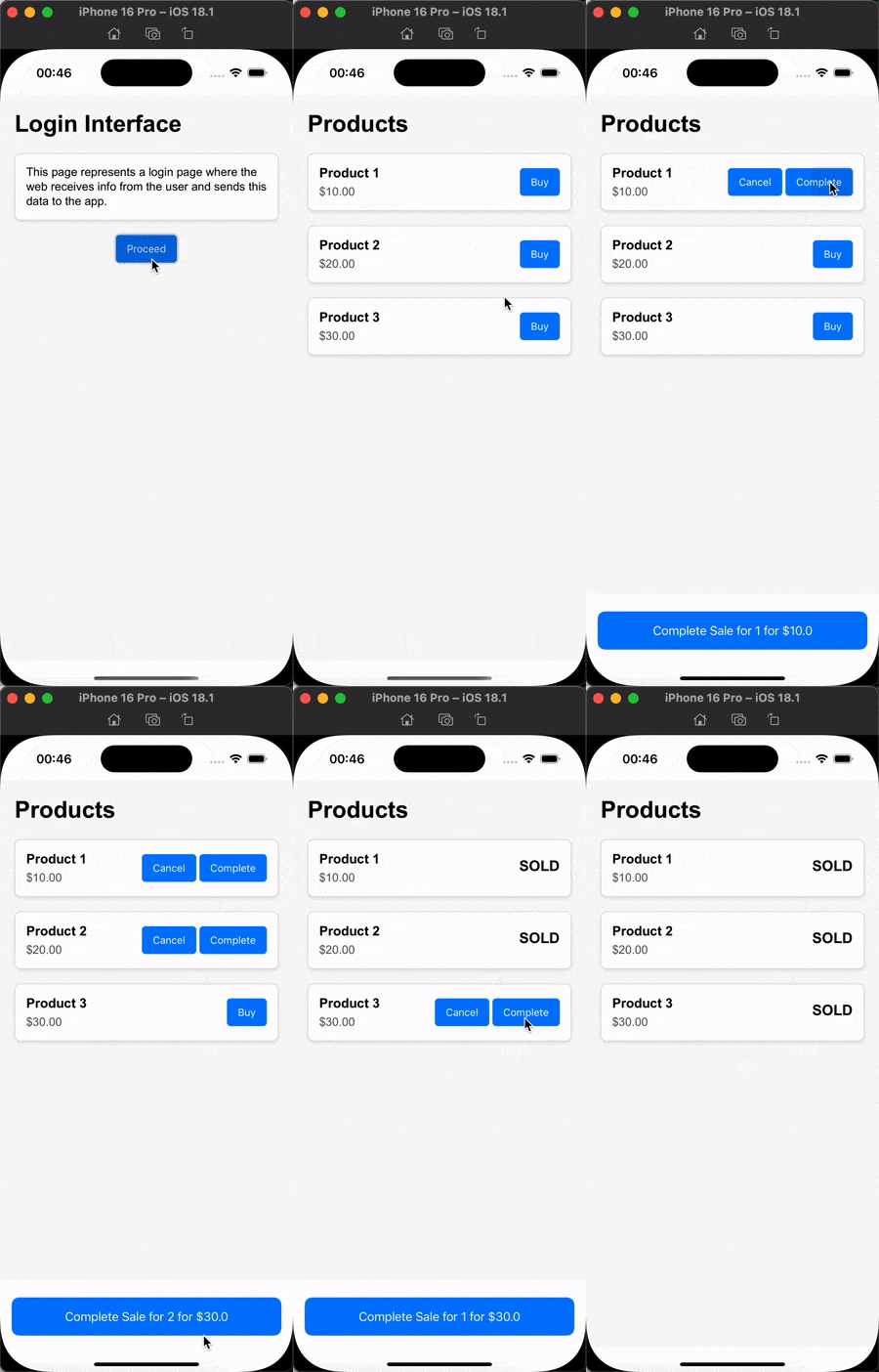
So, defining ViewModel with WebViewJSHandler, View as a UI blueprint, sample html with some actions, and some SwiftUI-based native UI components we finally combine all parts together and can test everything.
On my side I got this:
Best Practices
- Security: Always validate and sanitize
JavaScriptinputs to prevent vulnerabilities. Protect the message you sent. - Performance: Avoid heavy computation in
JavaScript; delegate toSwiftwhere possible. - Testing: Test interactions thoroughly on various devices and techniques to ensure a seamless user experience and a quick development and feedback from your system.
Pitfals
- Attaching multiple event listeners to the same element (e.g., a button) can cause the same function to execute multiple times.
- Mixing inline event handlers (e.g.,
onclick="someFunction()") in HTML andJavaScriptaddEventListenercalls can lead to double executions of the same event. - Adding event listeners dynamically and not removing them when they are no longer needed can lead to memory leaks.
- The this keyword behaves differently in regular functions and arrow functions, which can lead to confusion or unintended behavior.
- Event propagation can sometimes lead to unintended behavior, especially when elements are nested inside each other.
- Functions that use
setTimeoutorsetIntervalmay lead to unexpected behavior when they are executed multiple times due to race conditions, improper clearing of intervals, or multiple invocations of the same function. - A button click handler can be re-triggered multiple times if the button is not properly disabled or if asynchronous operations are allowed to reset the state.
Source code
The source code available here
Conclusion
Integrating JavaScript into an iOS native app using Swift is straightforward with tools like WKWebView and JavaScriptCore.
By combining the power of JavaScript with the native capabilities of iOS, developers can create feature-rich and dynamic applications.
Resources
Share on: